












May 26, 2013

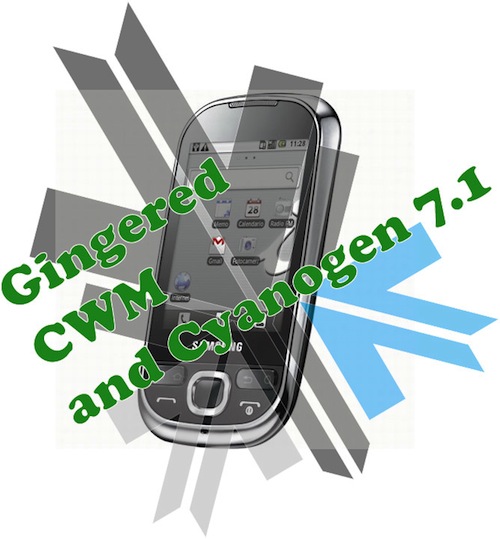
Update : How to Install Android 2.3.4 Gingerbread on the Samsung Galaxy 5 (i5500 / i5503) + Cyanogen Mod 7.1
Print

Update : Oct 9th 2011

The Guide has been updated to include the latest rom update. For those who have already used this guide and are on the Madteam rom v1.0 (those who used the guide from Aug 15th) use the steps at the bottom of the page to upgrade.

New iGyaan Guide 

Did you think it was possible?, we didn’t either!. But following various guides and tweaks we were able to get Cyanogen mod 7.1 running on the Samsung Galaxy 5, Yes the 1.5 year old device from Samsung.

The big differences we saw:

  • Tremendous improvement in battery life, almost fixes any battery leaks.
  • Fast and responsive OS Android 2.3, no lag and no jitters.
  • Clean looking UI + Cyanogen mod tweaks
  • Best Part : Nexus S style : CRT TV lock animation

This Guide was put together using our own experience, and its here to help you out.

Note: Like any other unofficial guide, there is a high chance that you might brick your phone.  iGyaan is in no way responsible for that and you are following this at your own risk.
 
Okay so lets begin!
Here is what you need 
  1. The iGyaan Galaxy 5 Pack : Download Here
  2. A Galaxy 5 : Duh!
  3. Widows PC
  4. USB – Micro USB data cable
  5. Patience and Humility.
  6. A MicroSD card with over 1GB free space.

Step 1 (Important)

  • Backup all your contacts and files.
  • Sync your device to your Gmail Accounts

Step 2 (Device Prep)

  • Time to put your Galaxy 5 in download mode
  • Power off your Galaxy 5
  • Hold Volume Down + Home + Power Button 
  • You should see the Download Screen
 

Step 3 (Install Recovery)

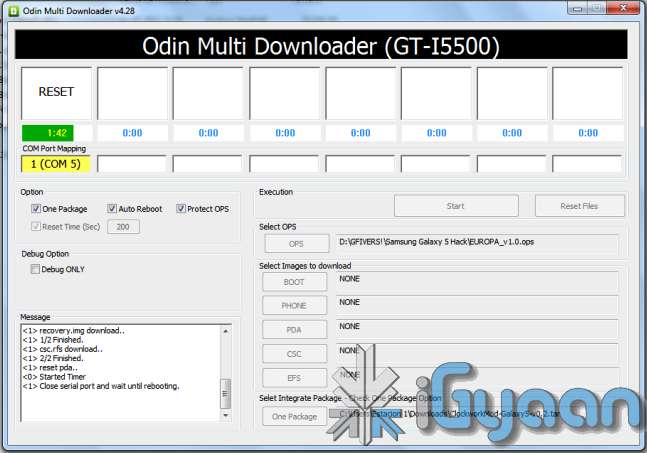
  • Fire up ODIN (found in the iGyaan Galaxy 5 pack)
  • Select the EUROPA_v1.0.ops  in the OPS field ( also in the iGyaan Pack)
  • Select One Package and ClockworkMod-Galaxy5-v0.4.tar in the one package Field
    (Also in the iGyaan Package downloaded earlier.)
  • Connect your phone to your pc via usb cable, wait for it to show up in ODIN
  • Once it shows up click START ( follow the images below)


IMPORTANT 


Your Device Should now boot up in Clockwork Recovery like the image below.

WARNING : DONT UNPLUG OR REBOOT your PHONE HERE.


Step 4 (Copy files)

  • Using the D pad or Volume +/- buttons browse to Mounts and storage
  • Once in mounts and storage select “Mount USB Storage”
  • Your memory card will show up on your PC
  • Copy the “update-cm-7.1.0-RC1-MADTEAM-v1.6-signed.zip” to the memory card ( found in the iGyaan package)
  • Once copied, Safely remove /eject the memory card mount from your PC
    (Do not remove it from the phone and do not reboot the phone
  • Press the  back button several times, till you reach the main screen as the image above.

Step 5 (Backups)

  • Browse to Backup and Restore
  • and select backup ( let the device backup your existing rom on the memory card)
  • Once done press the back button to come back to the main recovery screen.

Step 6  (Install Prep)

  • Browse to Wipe date /factory reset and initiate it by selecting “yes”
  • Browse to wipe cache / initiate it by selecting “yes.”
  • Browse to advanced : Wipe dalvik cache.

Step 7 (Install the Rom)

  • Browse to “Install zip from SD card”
  • Choose “Select zip from SD card”
  • Select the “update-cm-7.1.0-RC1-MADTEAM-v1.6-signed.zip” we copied to the memory card earlier.
  • Initiate it by selecting “yes”

Step 8 (One more thing!)

  • Once its done Reboot by selecting reboot system now from the main menu
  • At this moment your device will boot in Cyanogen Mod 7.1 for Galaxy 5. on Android 2.3.4
  • Its not over yet!
You will still need the Google Apps package to get the Market , Gmail, etc

Step 9 (Install Google Apps)

  • Once your phone is booted press the power button
  • Select “reboot”
  • Select “recovery” 
  • You will boot back into Clockwork Recovery
  • Go to Mounts and Storage and select “Mount USB storage”
  • Connect your device to a PC
  • Download and copy the following file to the memory card of your phone : Google Apps iGyaan.zip
  • Once copied  : come back to main recovery screen and select “Install zip from SD car”
  • Select the “select zip from sd card” and choose “google apps iGyaan.zip” : install by selecting “Yes”

Step 10 ( Final Steps)

  • Once all the above is done : reboot your phone
  • You will be boot into Cyanogen Mod 7.1 , but this time you will get the “Tap Android to Start” screen.
  • Follow the directions on the screen.

Enjoy your newly revamped Galaxy 5.!

This rom comes highly recommended, we installed it on our Galaxy 5 and its almost like a new phone, its much faster cleaner and much more stable than the Samsung Official Rom. this rom also improves the battery life by more than three times.

Leave your feedback below, and if you were able to do it properly.

If you have any problems post all your questions in the iGyaanforum.com thread over HERE 


Steps to Upgrade if you have used the Old Guide


Step One

  • Download the new iGyaan Package : Here 

Step Two

  • Use a usb cable / sd card reader to copy the file “update-cm-7.1.0-RC1-MADTEAM-v1.6-signed.zip” to the SD Card root folder (the file is in the iGyaan Package) 

Step Three

  • Reboot into recovery using the Rom Manager And choose “backup and restore”

    Next Create a new Backup.

Step Four

  • From the Recovery main screen select “install zip from SD Card”
    and choose the file you copied above

Step 5

  • Once the install is complete reboot the device and wait for it to load : first boot can take upto 15 minutes


Enjoy the update with tons of bug fixes !


As always the guide here is for informational purposes, iGyaan is not responsible for any softwares being used here and are courtesy their original developers. We therefore take no responsibility for any damages that may occur to your device.

Article Tags

Related Posts

250 comments
parthu
parthu

i am unable 2 download the igyaan pack.pls send me another link


zhiquestra
zhiquestra

how about my galaxy 5 is in android 2.3.1 kernel??? can i upgrade it to 2.3.7 gingerbread +cyanogen mod 7.1?????? how?


niveditagopal90
niveditagopal90 like.author.displayName 1 Like

 @evollution hey I did all the steps as mentioned above bt at the tym of reboot its showing Samsung and android  again and again and the phone is not starting....PLzzzz help 

boogy
boogy


try to get your battary out wait a minute and put back in


boogy
boogy

hi 

i'm in the middel of the botting and the  Google Apps iGyaan.zip doesn't work

can you send me a new link to igorgumush19990@gmail.com

dave5chintan
dave5chintan

@boogy Hey

Not able to perform STEP 3. When i downloaded from link iLivid got downloaded. Not sure how to Fire up ODIN and from where? Pls help. My mail id is chintandave1412@gmail.com

soumik
soumik

I performed all steps as mentioned above but my phone went into bootloop, now what to do ,can anybody help me?can somebody tell me how to flash stock rom through odin? 

frenchCan
frenchCan

Same thing for mine. Do you have any solution? How can I downgrade my phone to 2.1 then upgrade to 2.2 and then 2.3?

soumik
soumik

 @frenchCan I don't know about 2.3 but when I flashed above file my phone went into bootloop so had to flash stockfirmware from samfirmware.com through odin. the firmware i downloaded had android 2.2 so got android 2.2 from there. And after that experience of bootloop I will prefer to use it with 2.2 .

ElatedFriend
ElatedFriend

the google apps igyaan.zip is not working. please send us another link or files.

ronaldnueva
ronaldnueva

where can I find this? Google Apps iGyaan.zip


evollution
evollution

I upgraded last night. Just I have some issues now:

3G is not working ..

Reboot option doesn't work. Phone remains "hanged up". I have to remove battery and turn on again

Many, many crashes !!


Any idea??

NeerajBeck
NeerajBeck

FINALLY after a very long struggle.......... it finally done.... and thank you......!!! :D :D :D.... and wow the interface is so cool......!!

amith robin
amith robin

i was not able to download The iGyaan Galaxy 5 Pack

jass
jass

where is samsung app store????????

Karthik S Kashyap
Karthik S Kashyap

Hi, I am unable to download the above zipped software. It displays as "This file does not exist, the access to the following file is limited or it has been removed due to infringement of copyright". Please help me out by sorting out this issue. My Android OS is corrupted. Please help me to download and install it on my phone.

vishal
vishal

cant connect to kies

androidguy
androidguy

How do i downgrade back to froyo after installing android 2.3.7 on my galaxy I5503

narender
narender

Hi, I tried the process as its written in the post. Everything succeeded but when i connect to bluetooth with other device its not sending the data saying forbidden of device but receiving from other mobiles what to do help me

Sharique
Sharique

JSt Want To Upgrade my Samsung GT-I5503 To Android 2.2 but many times i try there is a prblm looks like this Download Start… Create File… StartThread Detected : 1 StartThread Detected : 0 StartThread Detected : 0 StartThread Detected : 0 StartThread Detected : 0 StartThread Detected : 0 StartThread Detected : 0 StartThread Detected : 0 Any ONE PLEASE HELP

balwinder singh
balwinder singh

I have upgrade my galaxy 5 , but I can't get Google apps igyaan.zip. place give me Google apps igyaan.zip link.

Malcolm
Malcolm

Links not working!!!Mail me new links mlclmv@gmail.com

yolz
yolz

dead link... need updates...

marram6556
marram6556

hi link not working!!!! please maile it to me tanx marram6556@gmail.com

Srooney62
Srooney62

Hey , I've now ReDone these step 3 times , all is working fine but...... each time I dont get the Google play app... , I've downloaded it as a apk and installed it fine but the app does not work as such..  , any help please ? 

Fredislt
Fredislt

THANK YOU  , It WORKS PERFECT  !!!!!!!    You are the BEST   !!!!!!!!!!!!!!

Rivanleite
Rivanleite

Done using Mobile Odin, thanks. Awesome Rom.

Vsmarjanski
Vsmarjanski

Batery life now is 30-35 hours and it was up to a 130 hours before. What should I do ? 

Kamil
Kamil

Please reupload the pachage if it still works!

Agupta_92
Agupta_92

I am not able to download your package. Please update that link. It not opening

Prashant
Prashant

i m trying to upgrade 2.1 to 2.3 my phone galaxy 5 5503i did that step by step now its not starting my phone its restarting frequently  

Hanan
Hanan

open CWM and wipe data/factory reset

Csj
Csj

Link is not working....

Pradeep
Pradeep

works great!!!! thank you guys :)

Guest
Guest

Just installed this on my Galaxy 5. Battery life was significantly improved. I use the SetCPU app to set processor speed to minimum when the screen is off (not sure if this helps) and my battery lasts about a week or more.

Ram
Ram

Hi... Instead of writing down the step by step instruction you can make a video of how to change from 2.1 to 2.2 and from 2.2 to 2.3.4 in galaxy I5503  ...... If you do so it will be very easy for everyone to understand.... I hope you do a video about this asap.... 

Vamsi Anil M
Vamsi Anil M

Can you guide me on how to install eclair 2.1 in my galaxy i5503, where I recently upgraded to froyo.. Im not satisfied with froyo. I just want to revert back.

Patrick Palm
Patrick Palm

Not only did your entire software collection come from madteam but the entire guide is a madteam guide in itself too. And not a single acknowledgement of the hard work of madteam? You should be ashamed of yourself, this isn't Red China.

Superhuman
Superhuman

The guide is not copied from any where : the first line states clearly the rom is from madteam  "The Guide has been updated to include the latest rom update. For those who have already used this guide and are on the Madteam rom v1.0" As for as cred the last line states that "softwares being used here and are courtesy their original developers" Too bad your sole purpose was to troll on the site without reading the first or the last line of the page

Malay Mukherjee
Malay Mukherjee

want to install android 2.3 on my viewpad 7. can you help?

Amalnalinam
Amalnalinam

how much time it would take to compete step no; 2?

POST A COMMENT.